 DocuAssist.AI Guide
Website chatbot overview
A website chatbot (an AI assistant) answers your website's visitors from your own knowledge: your documents, your web pages and answers you write. It never makes things up, and says so when it doesn't know. Open it from Website Chatbot in the menu.
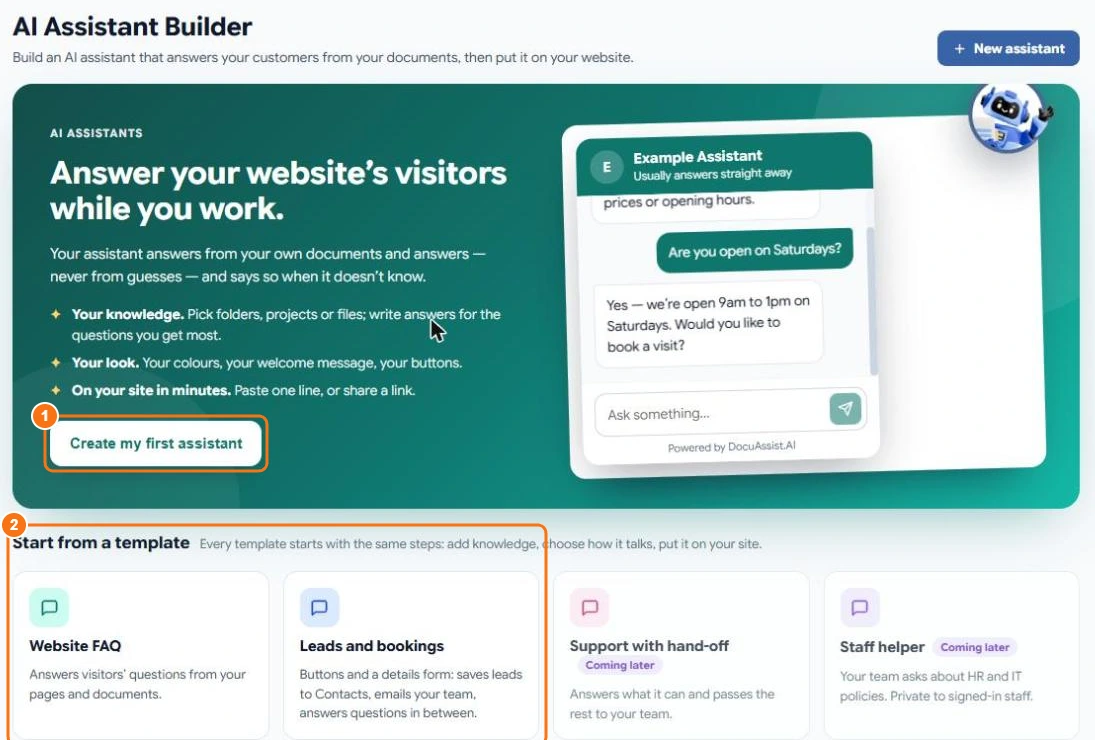
Create a chatbot
- Select Website Chatbot, then Create my first assistant (1), or start from a template (2):
- Website FAQ — answers visitors' questions from your pages and documents.
- Leads and bookings — buttons and a details form that save leads to Contacts and email your team, with questions answered in between.
- Give it a name. Visitors see the name in the chat window.
The chatbot starts as a Draft. Nobody can chat with it until you add a website and publish it.
Set it up
| Tab | What you do there |
|---|---|
| Knowledge | Choose what it answers from, and test it. See Chatbot knowledge. |
| How it talks | Its personality, guided conversations, guardrails and AI model. See How it talks and Guardrails. |
| Look | Colours, logo, welcome message and the launcher button. |
| Embed | The websites it may appear on, and the code to add. See Look and embed. |
| Chats | Every conversation visitors had. See Chats. |
| Budget and usage | Its monthly credit budget, alerts and a usage report. See Budget and usage. |
Publish
Select Publish when it is ready. A small number on a tab shows what still needs doing; DocuAssist.AI lists anything that must be fixed first, such as adding a website. After you change a published chatbot, select Publish changes for visitors to see them.
What it costs
Each answer uses credits, from about 2 credits for a simple answer with a fast model. You can set a monthly budget per chatbot. See Credit rates.
Related
Last updated on November 18, 2026