 DocuAssist.AI Guide
AI Workflows overview
AI Workflows do repetitive work on your documents and email for you. A workflow starts when something happens — an email arrives, a document is added, a signature completes — or when you press Run, then follows the steps you set: read, decide, file, tag, draft or send. Anything sensitive can stop and ask you first.
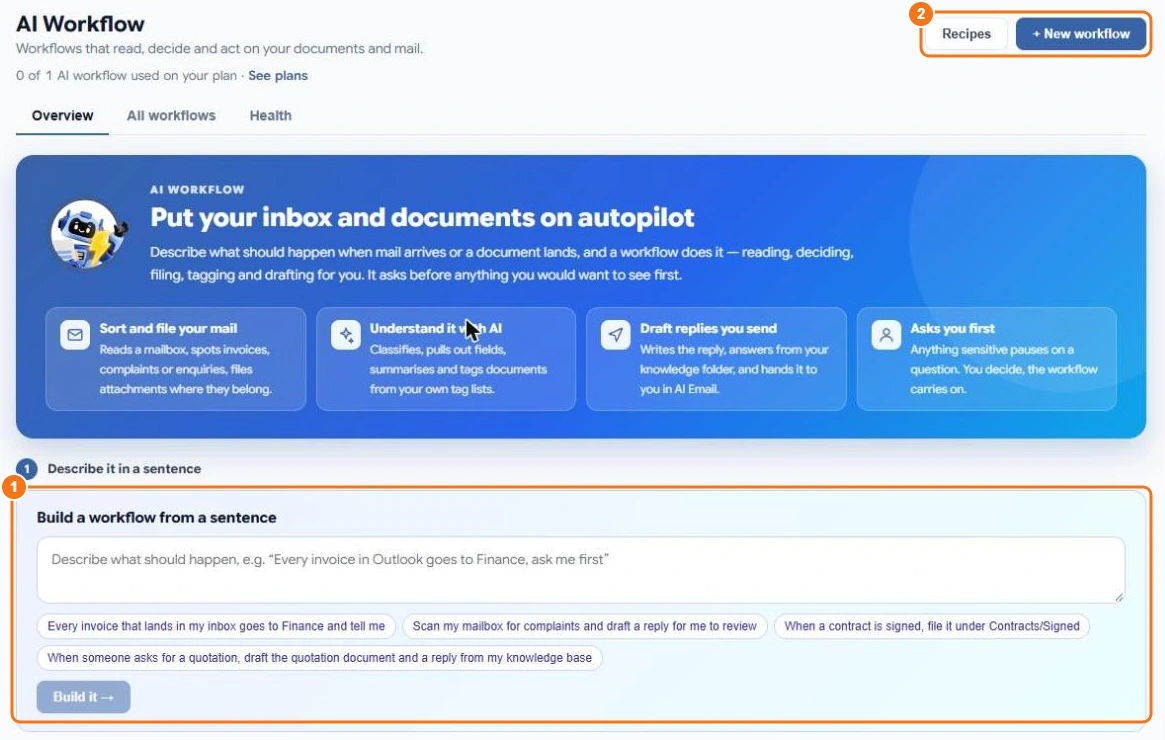
What workflows can do
- Sort and file your mail — read a mailbox, spot invoices, complaints or enquiries, and file attachments where they belong.
- Understand documents with AI — classify them, pull out fields, summarise and tag them from your own tag lists.
- Draft replies you send — write the reply, answer from your knowledge folder, and hand it to you in AI Email.
- Ask you first — pause on a question; you decide and the workflow carries on.
Three ways to start
- Describe it in a sentence (1) — type what should happen, such as "When a contract is signed, file it under Contracts/Signed", and select Build it. Atlas AI builds the workflow for you to check. See Build a workflow with Atlas AI.
- Use a recipe (2) — start from a ready-made workflow. See Workflow recipes.
- Start from scratch — select New workflow and build it in the designer. See The workflow designer.
How many workflows you can have
The Basic plan includes 1 workflow, Personal 5 and Professional 10. Deleted workflows don't count. See Plans and pricing.
What it costs
Each run uses 10 credits, plus the AI steps it uses and any emails it sends from DocuAssist.AI. Test runs use credits for their AI steps too. See Credit rates.
Related
Last updated on November 18, 2026