 DocuAssist.AI Guide
Compress a PDF
Make a PDF smaller, for example to send it by email.
Compress a PDF
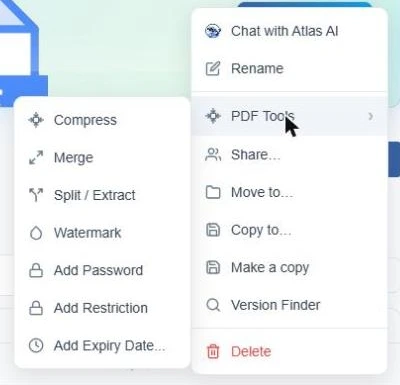
- In My Documents, select the PDF's row menu (⋯) and choose PDF Tools → Compress. The Compress PDF page opens with the file already selected.
- To compress more files at once, choose Select Existing or Upload New — up to five PDFs.
- Choose Low, Medium or High compression. Higher compression makes a smaller file, with lower image quality.
- Select Compress PDF.
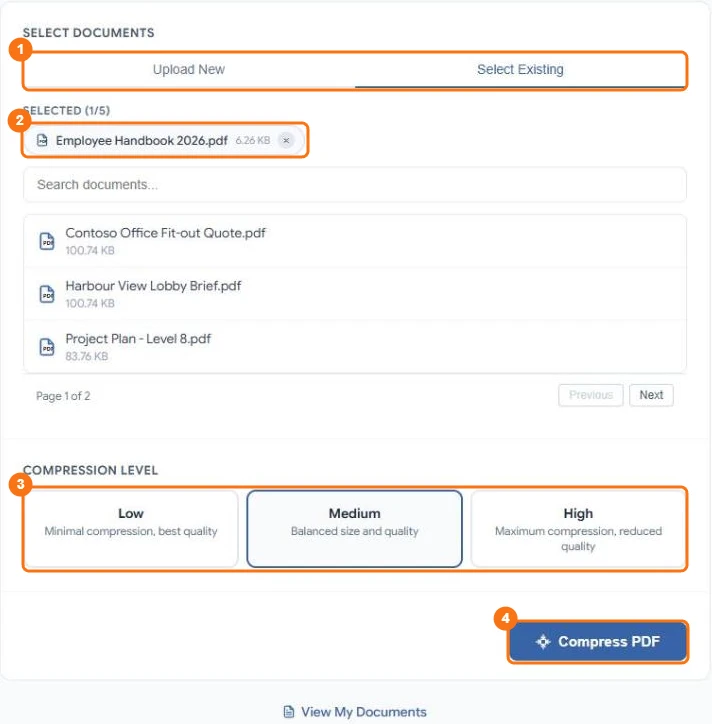
In the picture: 1 Upload New or Select Existing, 2 the PDFs you picked, 3 the compression level, 4 Compress PDF.
Compression runs in the background. You get a notification when it is done, and the smaller file replaces the original, with the same name and place.
Good to know
- The PDF tools are included in every paid plan. On the Basic plan you see an upgrade prompt.
- A PDF with a password or restrictions can't be picked on this page, and neither can one that is waiting for signatures. Remove the protection first, or use Bulk PDF tools, which asks for the password.
- To compress all PDFs in a folder at once, use Bulk PDF tools.
- Compressing uses 50 credits per document. If it fails, nothing is charged.
Related
Last updated on November 18, 2026