 DocuAssist.AI Guide
Credit usage history
Credit Usage History lists every credit used or added in your workspace — what it was for, how many credits, and by whom.
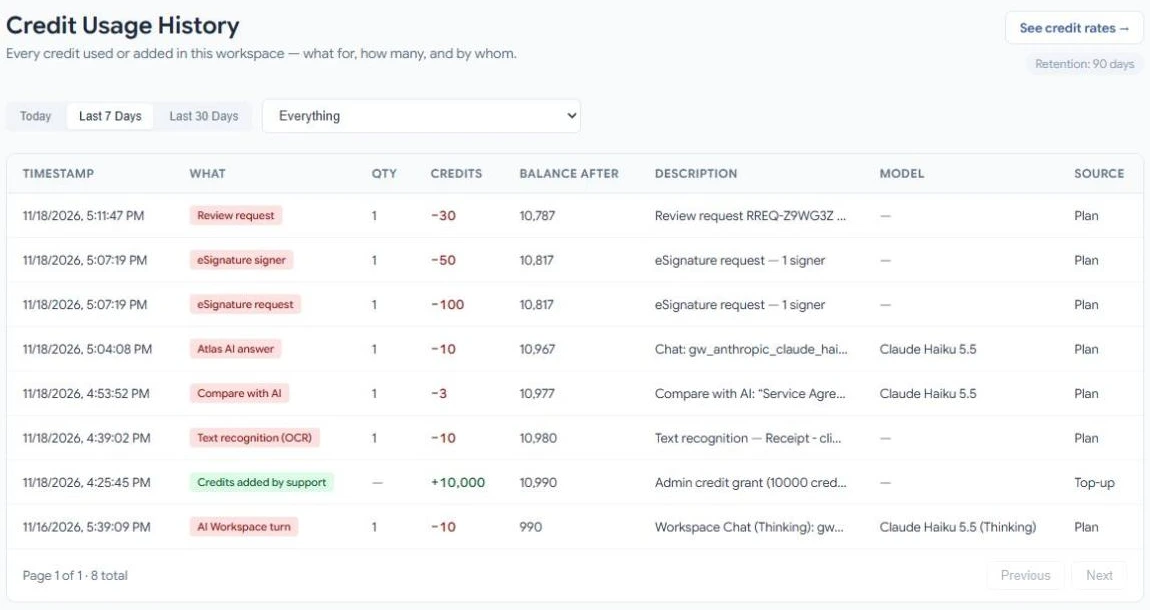
Open it
Select your credit balance at the top of any page, then select View credit usage history.
What each row shows
| Column | What it means |
|---|---|
| Timestamp | When the credits were used or added. |
| What | The feature, for example Atlas AI answer or eSignature request. Credits added are shown in green. |
| Qty | How many: pages, signers, emails or documents. |
| Credits | The credits used (minus) or added (plus). |
| Balance after | Your balance after this row. |
| Description | More detail, such as the request number or the file. |
| Model | The AI model that did the work, for AI features. |
| Source | Whether plan credits or top-up credits paid for it. |
Filter the list
- Choose Today, Last 7 Days, Last 30 Days or Everything.
- Use the list beside them to show one feature, or one kind of entry such as Plan credits added, Top-up purchased or Refund.
How long history is kept
History is kept for 90 days.
A charge looks wrong
Contact support with the date and description of the row. If a charge was made in error, support can refund it; the refund appears in the list as its own row.
Related
Last updated on November 18, 2026