 DocuAssist.AI Guide
Manage protected shares
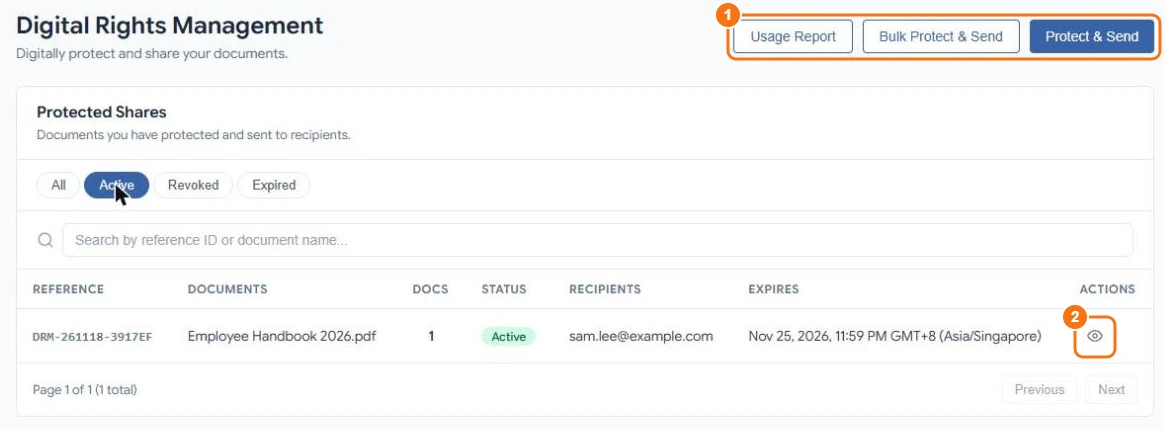
The DRM Documents page (Send → DRM Documents in the menu) lists every document you sent and lets you change or stop a share at any time.
Find a share
Filter by All, Active, Revoked or Expired, or search by reference or document name. Select Usage Report (1) for a summary of your protected shares.
Share details
Select the eye icon (2) to open a share.
From here you can:
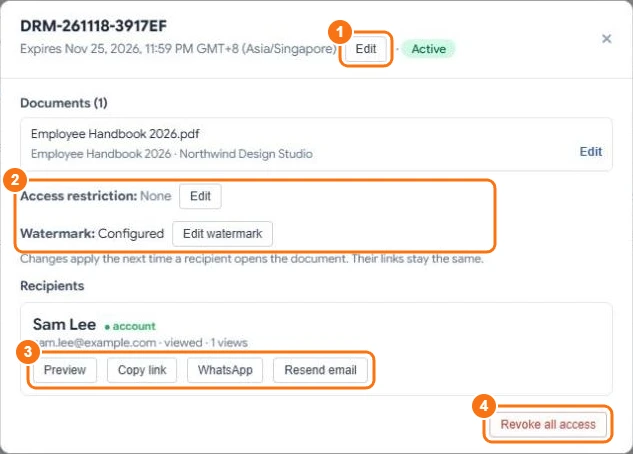
- Change the expiry date (1) — extending it uses credits for the extra time.
- Edit book information for each document.
- Change the access restriction or the watermark (2). Changes apply the next time a recipient opens the document; their links stay the same.
- See, for each recipient, whether they have an account, whether they viewed it and how many times.
- Preview the document as they see it, Copy link, send it by WhatsApp, or Resend email (3).
- Revoke all access (4) — every link stops working straight away.
Revoking or letting a share expire doesn't refund credits.
Related
Last updated on November 18, 2026