 DocuAssist.AI Guide
Workflow recipes
Recipes are ready-made workflows. Pick one, adjust the folders and tags, and turn it on.
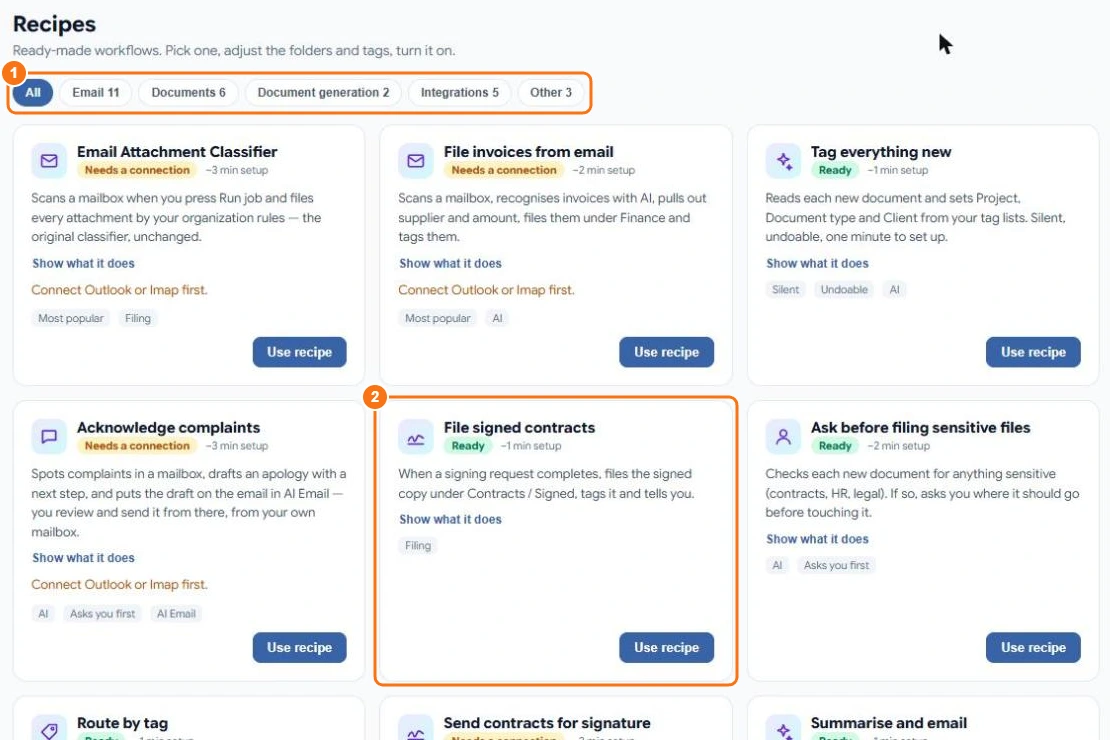
Use a recipe
- Select AI Workflows → Recipes.
- Filter by Email, Documents, Document generation, Integrations or Other (1).
- Select Show what it does to see its steps.
- Select Use recipe (2). Some recipes ask a few questions first, such as which folder to use.
- The workflow opens in the designer as a draft. Check it, then Save and switch it on.
A recipe marked Needs a connection needs a mailbox or another app connected first. One marked Ready works straight away.
Some popular recipes
| Recipe | What it does |
|---|---|
| File invoices from email | Recognises invoices in a mailbox, pulls out the supplier and amount, files them under Finance and tags them. |
| Email Attachment Classifier | Files every attachment in a mailbox by your organisation's rules when you press Run. |
| Tag everything new | Reads each new document and sets its tags from your tag lists. |
| File signed contracts | When a signing request completes, files the signed copy under Contracts / Signed, tags it and tells you. |
| Acknowledge complaints | Spots complaints, drafts an apology with a next step, and puts the draft on the email in AI Email for you to send. |
| Ask before filing sensitive files | Checks each new document for anything sensitive and asks you where it should go. |
Related
Last updated on November 18, 2026