 DocuAssist.AI Guide
Scanned documents and text recognition (OCR)
Scanned pages and photos don't contain text a computer can read, only a picture of it. DocuAssist.AI uses text recognition (OCR) to read the words in them, so you can search for them and ask Atlas AI about them.
What happens automatically
When you upload a PDF, DocuAssist.AI checks each page. Pages with little or no readable text — such as a scanned signature page in an otherwise normal contract — are read with OCR. Pictures (PNG, JPG, GIF, WebP and BMP) are read the same way.
This happens in the background after the upload, so a long scanned document can take a few minutes before search finds its words.
You don't need to do anything: the recognised text is used for:
- Search — find scanned documents and photos by the words in them.
- Atlas AI — ask questions about them. When a page has no text, Atlas AI can read it on request in Thinking mode.
Scanned email attachments
When a project or an AI workflow reads an attachment from your mailboxes, scanned pages in it are read with text recognition too. While that runs, the attachment says scanned — Atlas AI is reading it; the rest of the email is ready for Atlas AI straight away.
- Pictures attached to emails, such as photos, logos and screenshots, are kept so you can open them, but Atlas AI doesn't read them.
- Reading scanned pages uses credits from the person whose mailbox the email came to.
Turn it off for your mailboxes
- Open Email settings
On the Emails page, select the cog at the top right.
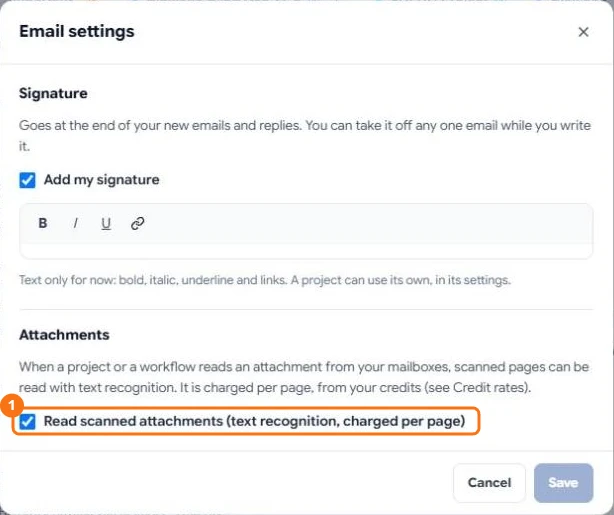
- Untick Read scanned attachments
Under Attachments, untick Read scanned attachments, then select Save.
With the switch off, scanned attachments from your mailboxes say scanned — not read, text recognition is off in AI Email settings. Attachments that already contain text are still read.
Languages
OCR reads Latin-script languages such as English and Malay, plus Chinese and Japanese. Korean isn't supported yet.
Limits
- Very blurred or faint text may not be read. Text DocuAssist.AI isn't confident about is left out rather than guessed.
- Long documents: only the first pages that need it are read automatically.
- An attachment that can't be read is marked couldn't be read and skipped, so it doesn't hold up the rest.
- The file itself isn't changed: no text layer is added to your PDF.
Credits
Text recognition uses credits for each page it reads. Pages that already have text don't need it. The price is on the Credit rates page, under Documents.