 DocuAssist.AI Guide
Run and monitor workflows
Once a workflow is built, switch it on and keep an eye on it from the AI Workflows page.
Your workflows
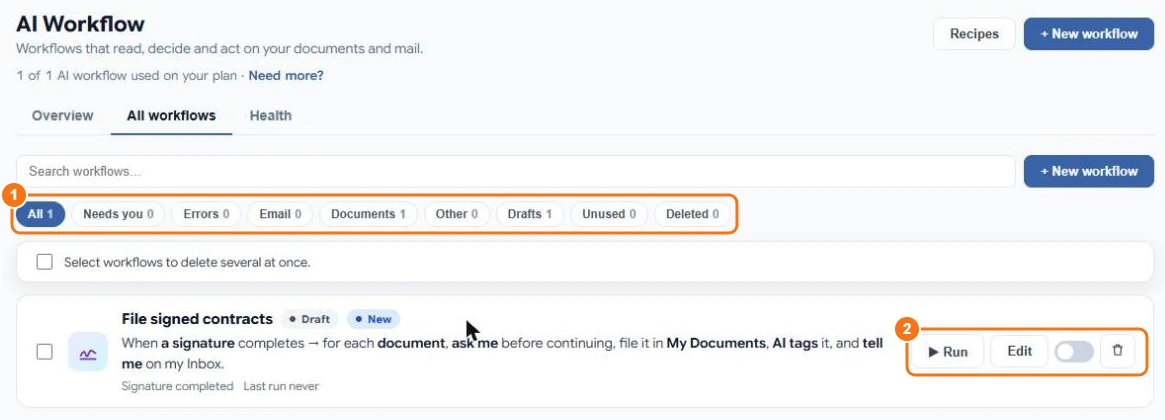
The All workflows tab lists every workflow with its sentence, its trigger and when it last ran. Search or filter with the chips (1): Needs you, Errors, Email, Documents, Drafts, Unused or Deleted.
For each workflow (2):
- Run — run it now.
- Edit — open the designer.
- The switch — turn it on or off.
- The bin — delete it. Deleted workflows can be restored from Deleted.
Rehearse with a test run
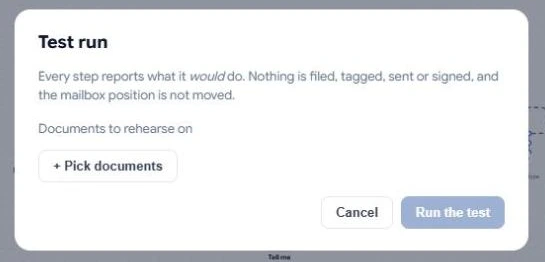
In the designer, select Test run and pick documents (or emails) to rehearse on. Every step reports what it would do — nothing is filed, tagged, sent or signed. AI steps still use credits.
Run a workflow by hand
Select Run (or Run job in the designer). What happens depends on the workflow:
- a workflow that reads a mailbox asks whether to handle new mail only, mail since a date, or emails you pick;
- a workflow that starts from documents asks you to pick the documents;
- any other workflow starts straight away.
Each run opens a progress page showing each step as it happens.
When a workflow needs you
An Ask a person step pauses the workflow and asks you, for example "File signed document?". Questions waiting for you appear under Needs you (the AI Workflows badge in the menu counts them) and in your Tasks. Choose an answer and the run carries on where it stopped. Replies drafted by a workflow are waiting for you on the email in AI Email.
Health
The Health tab shows active workflows, runs and errors in the last 7 days, workflows that haven't run for 30 days, and connections that need attention. Each error is explained in plain words with what to do.
When does a workflow run?
Workflows run when something happens (a new email, a new document, a changed tag, a completed signature) or when you press Run. Scheduled runs are coming later.