 DocuAssist.AI Guide
Guardrails
Guardrails keep your chatbot on topic and safe. Some protections are always on; the rest you can tune. Open How it talks → Guardrails.
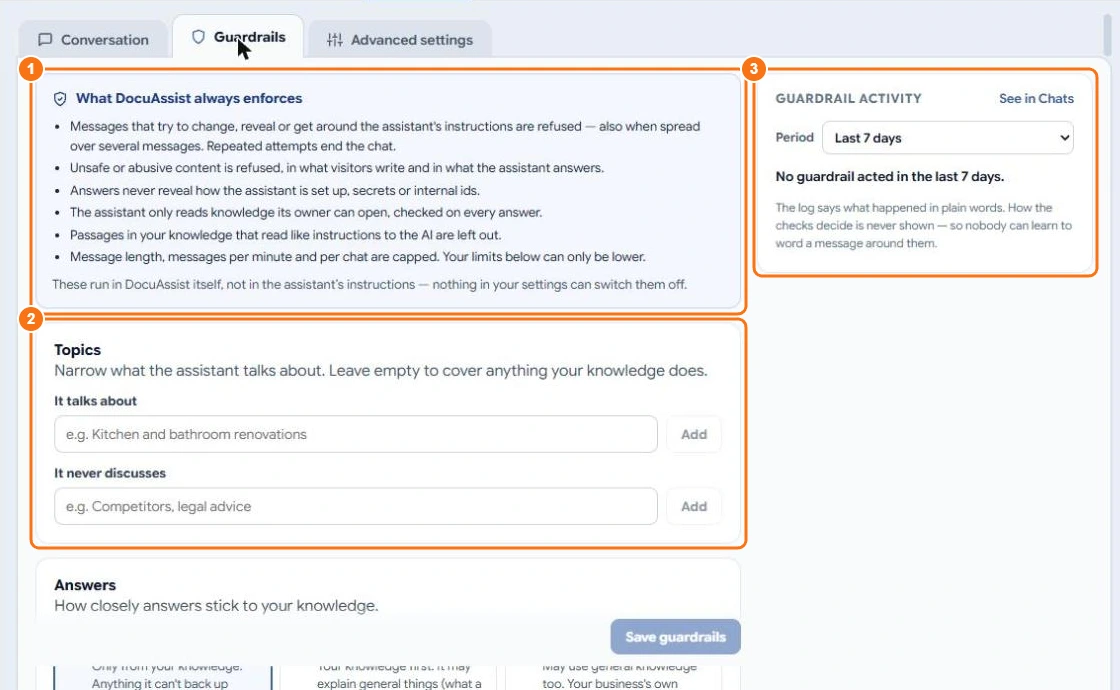
Always on
DocuAssist.AI always (1):
- refuses messages that try to change, reveal or get around the chatbot's instructions — even spread over several messages — and ends the chat after repeated attempts;
- refuses unsafe or abusive content, from visitors and in answers;
- never reveals how the chatbot is set up, secrets or internal ids;
- only reads knowledge its owner can open;
- leaves out passages in your knowledge that read like instructions to the AI;
- limits message length and how many messages can be sent.
These run inside DocuAssist.AI itself; nothing in your settings can switch them off.
Topics
Narrow what it talks about (2): add topics under It talks about and It never discusses. Leave them empty to cover anything your knowledge does.
Answers
Choose how closely answers stick to your knowledge:
- Strict — only from your knowledge. Anything it can't back up becomes "I don't have that information".
- Balanced — your knowledge first; it may explain general things, never your prices, policies or contact details.
- Loose — may use general knowledge too; your business's own details still come only from your knowledge.
You can also link answers to the website page they came from, add a disclaimer under answers, and list phrases it must never use.
Visitor privacy
With Hide personal details on, email addresses, phone numbers, card numbers, bank account numbers and ID numbers that visitors type are hidden before the AI reads them and before the chat is saved. Choose to hide them and keep the message, or refuse the message. Add your own kinds, such as customer numbers. Turning this off is recorded with your name and a reason.
Messages and limits
Write what visitors read when a guardrail stops a message or there is no answer, choose whether to offer a person, refuse rudeness and swearing as well as abuse, and lower the message limits.
Guardrail activity
The panel on the right (3) shows what the guardrails did, in plain words. Select See in Chats to open the conversations.