 DocuAssist.AI Guide
How credits work
DocuAssist.AI uses one credit balance for everything that costs something to run: Atlas AI answers, the PDF tools, reading scanned pages, eSignature and review requests, Protect & Send, and AI Email sorting. You don't need a separate subscription for each feature.
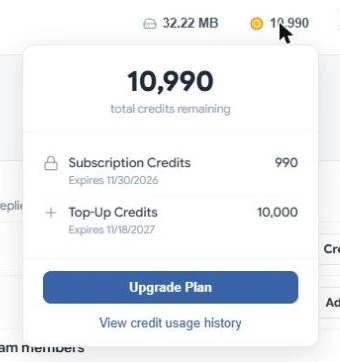
Where credits come from
- Plan credits — every plan includes credits each month: 1,000 on Basic, 10,000 on Personal and 30,000 on Professional. They refill at the start of each billing period.
- Top-up credits — on a paid plan you can buy extra credits whenever you need more.
Which credits are used first
Your plan credits are always used first, because they expire at the end of the billing period. Top-up credits are used only after your plan credits run out, starting with the ones that expire soonest.
When credits expire
- Plan credits expire at the end of each billing period. Unused plan credits do not carry over.
- Top-up credits last 1 year from the day you buy them.
To see how many of each you have and when they expire, select your credit balance at the top of any page.
Check your balance
Your balance is always shown at the top of the page. Select it to see your plan credits and top-up credits separately, with their expiry dates. Select View credit usage history for every charge.
Top up
Top-ups are sold on paid plans.
- Select your credit balance at the top of the page.
- Select Purchase Credits. The Top Up Credits window shows what your credits pay for and the credit packs side by side.
- Select Purchase under a pack and pay on the checkout page. The credits are added as soon as the payment goes through.
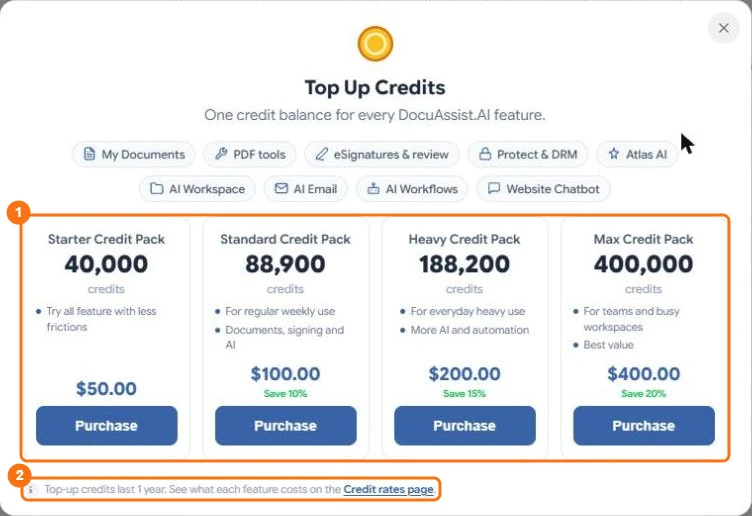
In the picture: 1 the credit packs, 2 the link to the Credit rates page.
Top-up credits last one year. The link at the bottom of the window opens the Credit rates page, so you can see what each feature costs before you choose a pack.
On the Basic plan, the same menu shows Upgrade Plan instead: a paid plan gives you a larger monthly allowance and the option to top up.
What happens when I run out?
If an action needs more credits than you have, DocuAssist.AI tells you how many it needs and opens the top-up window (or the upgrade options on the Basic plan). Nothing is charged for the action you could not run.

Prices are not shown next to each button, so you never have to stop and do sums. The Credit rates page lists every price in one place, and Credit usage history shows exactly what each action cost.
Are failed actions charged?
No. A background job that fails, such as a compression that could not finish, is not charged. AI answers are charged for the work done, even if you stop an answer before it finishes.